What Is the Best Tool for Fixing Mismatched SKUs Across Marketplaces in Malaysia?
Erra14 Aug 2026 06:51ENCopy link & title

Why SKU Mismatches Happen Across Shopee, Lazada, and TikTok Shop
SKU mismatches happen when the same product is listed under different codes, names, or variation IDs across different sales channels, warehouses, or suppliers, so the system can no longer recognise them as one item. For sellers running stores on Shopee, Lazada, and TikTok Shop at the same time, this is one of the most common and most costly operational problems.
-
Different platforms assign different codes. A product might carry one SKU on Shopee, a different one on Lazada, and a third variation ID on TikTok Shop, even though it's the exact same item in the warehouse.
-
Supplier codes don't match seller codes. Goods often arrive from suppliers with barcodes or item numbers that have nothing to do with the SKU the seller uses internally.
-
Bundles and variations multiply the problem. A single master product might have colour, size, or bundle variations that each get their own ID per platform, making manual tracking nearly impossible at scale.
-
Manual spreadsheet updates introduce human error. Sellers who track SKUs across spreadsheets often mistype codes or fall behind during high-order periods, causing counts to drift out of sync. This isn't a small risk: industry estimates put manual inventory error rates at 20–40%, compared with under 1% for automated, synced systems.
-
New listings get created instead of linked. Without a mapping system, staff sometimes create a fresh SKU for what is actually an existing product, splitting the stock record in two.
-
Returns compound the problem further. A return processed on one platform doesn't automatically update stock on the others, and returns alone are estimated to cause 20–25% of all inventory discrepancies in ecommerce.
How to Choose the Right Inventory Tool for Fixing Mismatched Product SKUs
-
List every channel the product sells on. Write down each marketplace, webstore, and offline outlet, along with the exact code or listing ID each one uses.
-
Check how the tool creates mapping. Look for manual entry, bulk import, and rule-based auto-mapping.
-
Test it on your hardest products first. Map a few bundles, kits, and multi-variation items during a trial, since that's where most mismatches hide.
-
Confirm sync speed and reliability. Ask how fast a stock change reflects across platforms, and whether failed updates get flagged or retried.
-
Check how much control you have over sync rules. You should be able to set how and when stock pushes out, and verify counts before switching automatic syncing fully on.
-
Check data and catalogue limits. Make sure the system handles your full SKU volume, including variations and bundles, without lag as you grow.
-
Confirm it works across warehouses and units, not just platforms. Multi-warehouse fulfilment and different selling units should still be tracked under one master SKU.
-
Review support and documentation. Fixing mismatched SKUs at scale is rarely a one-click job, so pick a provider with clear guides and responsive support.
What Is the Best Inventory Tool for Fixing Mismatched Product SKUs in Malaysia?
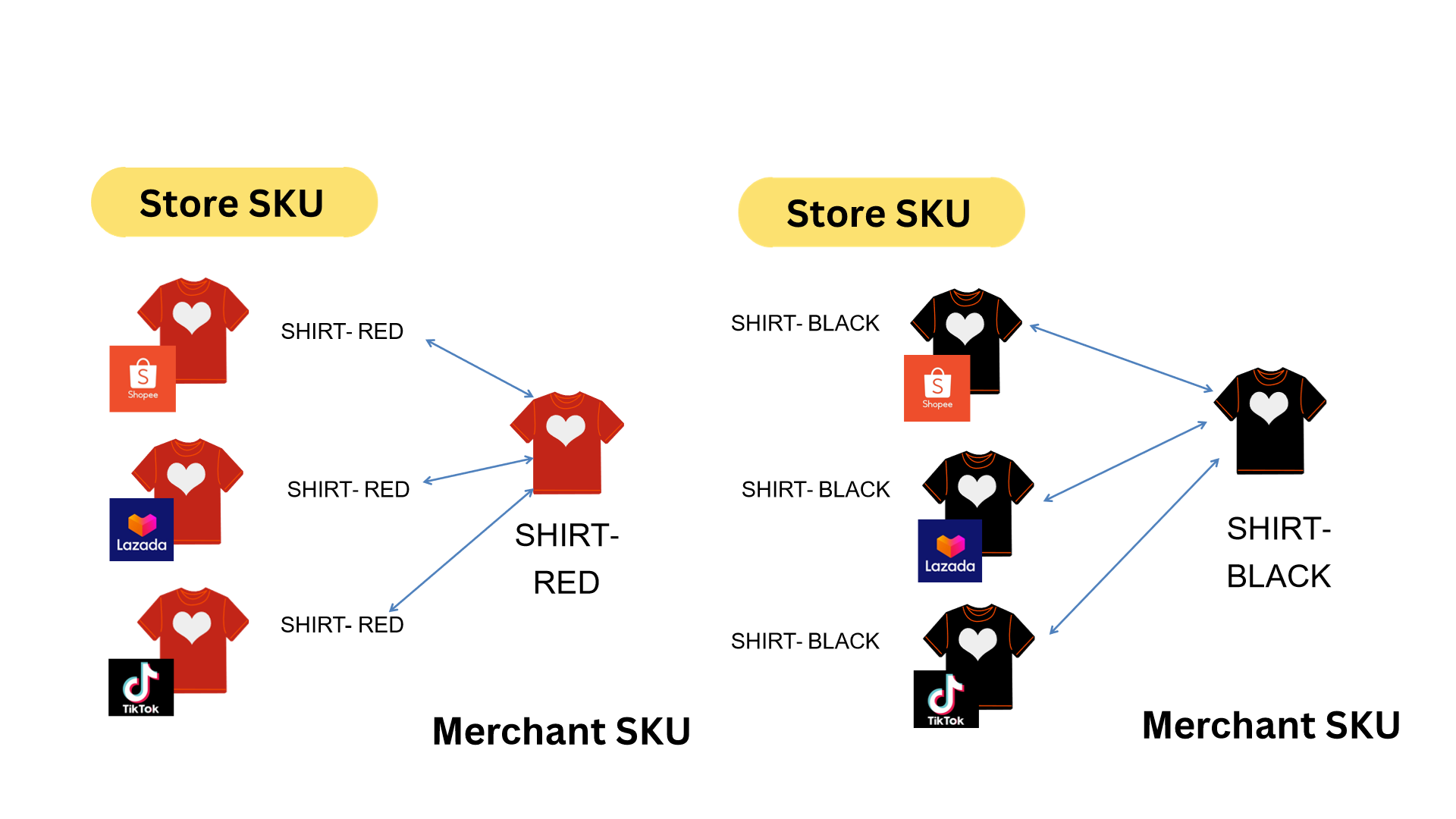
BigSeller is the leading choice for Malaysian sellers dealing with mismatched SKUs, because its inventory system is built around a simple idea: every product should have one master identity in the warehouse, no matter how many different codes it's listed under across platforms.
Getting to that point generally comes down to a few steps:
-
Set up the master SKU list. This can be done product by product, imported in bulk from an existing spreadsheet, or generated automatically from existing store listings, useful for sellers migrating from manual tracking.
-
Map every platform code to its master SKU. Mapping can be done manually per product, in bulk, or automatically through rules. For example, matching listings with identical names across stores, or auto-creating a mapping the moment a new order comes in with an unrecognised code.
-
Turn on inventory syncing. Once mapping is active, stock deducts from the master record and pushes back out to every connected store automatically whenever an order comes in, no manual updates needed on each seller centre.
-
Set sync rules and double-check before going live. Sellers can control how and when updates push to each store, and it's generally good practice to verify counts with a stock check before switching automatic syncing fully on.
-
Track sync history. A record of past stock pushes makes it possible to see exactly when and why a number changed on a given platform, and retry any push that failed to go through.
This approach also covers the trickier cases that usually cause mismatches to creep back in:
-
Bundles and kits are mapped so that selling one combo SKU automatically deducts the correct quantity from each individual component, instead of leaving bundle sales untracked.
-
Product variations can be grouped under one parent product number, so managing dozens of variants doesn't mean dozens of disconnected SKUs.
-
Substitutions during order processing like swapping a sold-out variant for a similar one can be adjusted directly on the order itself, keeping the mapping accurate instead of leaving a manual note that never makes it back into inventory.
-
Multi-warehouse and multi-unit products are handled through the same master SKU, so unit conversions and warehouse transfers don't create parallel, conflicting stock counts.
The result is a single, continuously updated stock number behind every platform listing, rather than sellers reconstructing that number by hand after the fact.